


KJV Holy Bible
5.012.00 Reviews
App Specs
- Version
- 1.3.20
- Updated On
- License
- Free
- Downloads
- 100,000+
- Developer
- Nicolas momo
- Categories
- Books & Reference
- Platform
- Android
Screenshots

 Analysis by AppCompare
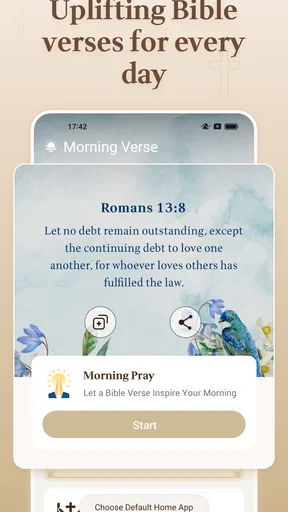
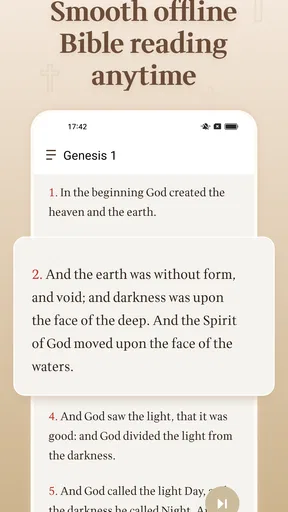
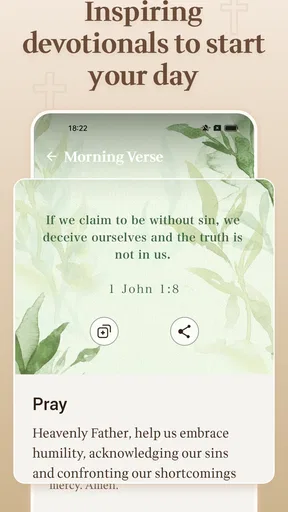
I approached KJV Holy Bible as a practical reading companion rather than as a replacement for every Bible study tool. It is a free Books & Reference app from Nicolas momo, built around the King James Version, daily verses, devotions, trivia, and access from the launcher. The most useful part of the experience is its offline focus: once it is on your device, you can return to Scripture, reflection material, and small moments of Bible-related study without depending on a connection.
That combination makes sense for someone who wants a straightforward KJV Bible available during a commute, a quiet morning, or a short break. I also found that its extra features change the rhythm of use. Instead of opening the app only when I had a specific chapter in mind, I could use a daily verse as a starting point, move into a devotional moment, or test my memory with trivia. It remains a focused tool, though, and readers who need extensive study references or a highly customizable reading system may prefer a more specialized alternative.
Getting from installation to a useful first reading
I’d use the first session to answer one practical question: can I get from opening the app to reading a passage without losing the quiet, focused feel I want? Starting with a familiar chapter makes it easier to judge the KJV text and navigation before exploring the extras. From there, the next section looks at how the app’s daily prompts and reading tools can fit into a routine.
What to expect when you open it
The app’s identity is clear from the beginning: this is a King James Bible reader with several lightweight ways to engage with the text. It is not trying to be a broad digital library or a general note-taking platform. That narrow purpose is a strength for first-time users because there is less to learn before reaching the main reason for installing it.
The offline design is especially important to understand. I would choose this app for a device that may spend time without reliable mobile data, such as a phone used while traveling or a tablet kept for personal reading. It also suits people who prefer not to make every quiet reading session depend on a web page loading correctly. The trade-off is that an offline-first experience will not feel like a constantly connected study service with a large ecosystem of online material.
The app is suitable for Everyone, which matches its simple presentation and broad purpose. It is free to use, so trying it does not require a purchase decision. Its current version is 1.3.20, and it works on devices running Android 10 or newer. Those details matter before installation: if your phone is older than that requirement, this particular reader may not be an option even though the app itself is uncomplicated.
Its reception is encouraging without being a reason to skip your own test. It holds a 4.9 average from roughly 1.6 thousand ratings, and the app has passed 100 thousand installs. I read those figures as signs that the basic experience is landing well with many users, not as proof that every reader will prefer its translation, layout, or extras.
Worth Reading Before You Choose

EA SPORTS FC Mobile 26 Is a Bigger Football Game, but It Takes Time

Flipboard Shows What News Apps Must Do Beyond the Feed

Switching to Android Auto Means Rethinking Your Driving Routine

Google Calendar Makes a Crowded Week Easier to Manage

Ludo King Makes the Most of the Minutes Between Plans

Baby Panda World Brings Quick Play to Modern Phones, but Its Game Library Feels Busy
Setting it up without overthinking the process
My advice for a first launch is to begin with the simplest goal: open the Bible and read a passage you already know. That gives you a quick sense of the typography, navigation, and wording before you spend time exploring the other sections. If the King James style feels comfortable, the rest of the app becomes easier to judge on its own merits.
There is no need to treat the daily verse or trivia as an obligation. They are better understood as alternate entry points. A daily verse can help when you want a short reading rather than a full chapter, while trivia is more useful after you have already spent time with the text. Starting with both at once could make the app feel busier than it really is, especially if your only aim is quiet reading.
I would also make the offline capability part of the initial setup routine. Rather than assuming that every part of the experience will behave exactly like an online service, test the passages and daily material in a place where your connection is unavailable or deliberately disabled. That small check creates confidence before you rely on the app during a journey, in a basement, or in another low-signal setting. It is a practical habit, not a criticism of the app.
The launcher access deserves attention because it can change how often the app becomes part of your routine. If you like quick reminders, having a Bible-related entry point close to the rest of your apps may reduce the friction between thinking about reading and actually starting. If you prefer to keep your home screen minimal, you may find that access unnecessary. The important point is that this feature is most valuable when it supports a habit you already want, not when it becomes another notification-like distraction.
Your first meaningful success
For a first successful session, I recommend a three-step workflow. First, choose a familiar passage and read enough to settle into the KJV language. Second, use the daily verse as a compact second reading rather than replacing the passage. Third, finish by trying a small piece of trivia only if you feel curious. This sequence lets you experience the app’s main layers without turning the first session into a tour of every button.
A realistic example would be a morning before work. I might open the app while drinking coffee, read a short passage offline, return to the daily verse for a single thought to carry into the day, and leave trivia for the evening. The value is not in completing a checklist. It is in having one place that supports a longer reading, a brief reflection, and a little recall practice depending on the time available.
Another useful scenario is a student or church reader preparing for a discussion. The KJV text can serve as the fixed reading source, while trivia helps reveal whether key details stayed in memory. I would still keep a separate notebook or study resource for deeper preparation, because a focused Bible reader is not automatically a full research environment. That distinction prevents disappointment and helps the app do the job it is actually suited for.
One less obvious advantage of this workflow is that it separates passive reading from active recall. Many people read a passage and immediately forget its details. Using trivia after a delay, rather than immediately after every verse, can make the session more reflective and less like tapping through a quiz. The app gives you the ingredients for that routine; the quality of the habit depends on how deliberately you use them.
Where first-time users may hesitate
The King James Version itself is the first possible point of friction. Its language can be meaningful and familiar to readers who specifically want it, but it is not the easiest choice for everyone. If you are new to the Bible or prefer contemporary wording, this app may feel demanding even when the interface is simple. I would not blame the app for that mismatch; I would treat the translation choice as the main decision to make before settling into regular use.
Daily verses can also create a misleading expectation. A single verse is convenient, but it is not the same as reading the surrounding chapter. In my view, the daily feature works best as a prompt to open the text, not as a complete substitute for context. When a verse raises a question, I would continue into the nearby passage instead of treating the isolated line as the whole message.
Trivia has a similar limitation. It can make Bible reading more interactive, but correct answers do not necessarily equal understanding. Someone may enjoy the challenge and still miss the larger theme of a book or chapter. I see it as a memory aid and a change of pace, not as a replacement for reflection, conversation, or careful study.
The offline promise is convenient, but it also encourages a different expectation from a connected Bible platform. If your ideal experience includes live community features, broad commentary collections, or a large library of translations, this app may feel intentionally small. I would choose a larger alternative for comparative study across translations. I would choose this one when dependable access to the KJV and a few focused extras matter more than an expansive research workspace.
A practical routine after the first day
Once the first reading feels comfortable, I would build a routine around available time rather than trying to use every feature daily. On busy days, open the daily verse and read the surrounding context. On quieter days, choose a longer passage and leave trivia for the end. This keeps the app from becoming a task to complete and preserves the calm quality that makes an offline reader useful.
A helpful advanced habit is to use the launcher access as a deliberate doorway. Put the app where you will see it when you are most likely to read, but avoid opening it automatically without a purpose. For example, a reader might use it during a morning pause, while another person may reserve it for an evening wind-down. The same access point can support either routine, but it works better when connected to a specific moment of the day.
I also recommend alternating familiar and unfamiliar passages. Familiar chapters make it easy to judge the reading experience, while less familiar books test whether the app remains comfortable when you are navigating without a strong memory of the structure. That combination reveals more than repeatedly opening the same favorite passage. It also gives the trivia feature a fairer chance to become useful rather than predictable.
For offline reading, think ahead about the sessions you want available. If you know you will be away from a connection, open the material you expect to use before leaving. That way, the app becomes part of your preparation instead of something you troubleshoot at the exact moment you need it. This is one of the most practical ways to benefit from its offline orientation.
How it compares with usual Bible-reading alternatives
Compared with a printed KJV Bible, this app is easier to carry and more flexible for short sessions. A physical Bible can offer a slower, less distracting reading experience, and some people will prefer the feel of paper for extended study. I would pick the app for portability and quick access, especially when I do not want to carry another book, but I would not claim it makes print obsolete.
Compared with a browser-based Bible site, the offline approach is the clearest difference. A website may be better when you want to search across many resources or compare several translations in one place. This app is more reassuring when the connection is weak or unavailable. The choice comes down to whether your priority is breadth and live access or a dependable KJV reader that stays useful away from the network.
Compared with feature-heavy Bible platforms, this app is less intimidating. Beginners may appreciate not being surrounded by a large collection of study tools before they have formed a reading habit. On the other hand, experienced readers who rely on extensive notes, cross-references, or layered research may reach its limits quickly. I would recommend starting here for uncomplicated KJV reading, but not switching away from a richer study platform if those advanced tools are central to your work.
Who will enjoy it, and who should choose something else
I think this is a strong fit for readers who specifically want the King James Version, need Bible access without an internet connection, and enjoy small prompts that make reading easier to revisit. It also suits someone who wants a free starting point rather than a complicated setup. The daily verse, devotional material, and trivia give different kinds of readers a reason to return, whether they have five minutes or a longer quiet period.
I would be more cautious about recommending it to someone who is still deciding which translation they prefer. The app’s focus is not a weakness, but it means the KJV choice should feel intentional. I would also point study-focused users toward a broader alternative if they need detailed annotations, multiple translations, or a large reference collection. The same applies to readers who want social discussion or an extensive multimedia experience rather than a compact offline tool.
My final test is simple: after installing it, can you reach a passage quickly, read without a connection, and find a natural reason to return tomorrow? With this app, the answer is likely yes if the KJV is the translation you want. The most satisfying use is not racing through every feature; it is creating a repeatable path from a launcher entry or daily verse to an actual passage and a little thoughtful reflection.
Overall, I see KJV Holy Bible as a focused, approachable option for KJV readers who value offline access and gentle variety. Nicolas momo has kept the central purpose easy to understand while adding enough daily and interactive material to prevent the app from feeling like a bare text viewer. Its limitations are equally clear: the translation will not suit everyone, and serious comparative study may call for a larger platform. For the right reader, though, the best feature is the low-friction path from a quick prompt to meaningful Scripture reading.
Pros
- Classic King James wording with a familiar
- literary style.
- Works offline
- making Scripture accessible without mobile data.
- Easy chapter and verse navigation for quick Bible study.
- Useful search tools help locate passages and keywords quickly.
- Often includes reading plans
- bookmarks
- and adjustable text settings.
Cons
- Archaic language may be difficult for modern readers to understand.
- Some editions include frequent ads or require purchases for extra features.
- Audio Bible availability and quality may vary by device or version.
- Search results can be less helpful with older spelling and phrasing.
- Large text and audio downloads may use considerable storage space.
FAQs for KJV Holy Bible
What is the KJV Holy Bible app?
The KJV Holy Bible app is a mobile Bible reader centered on the King James Version, one of the most recognized English Bible translations. It typically lets you browse the Old and New Testaments, search for verses or keywords, bookmark passages, and adjust reading preferences. Depending on the version you install, it may also include daily verses, reading plans, notes, audio narration, or sharing tools.
Does the KJV Holy Bible app work offline?
In most cases, the main King James Version Bible text can be accessed without an internet connection after the app and its content have been installed. This makes it practical for travel, church services, or areas with limited connectivity. However, features such as audio downloads, synchronization, advertisements, external links, or online study materials may still require mobile data or Wi-Fi.
Is the KJV Holy Bible app free to download and use?
The KJV Holy Bible app is generally available as a free download, allowing users to read the Bible without purchasing a physical copy. Some editions may contain advertisements, optional in-app purchases, or premium features such as ad removal, audio versions, advanced study tools, or additional translations. It is worth checking the store listing and subscription details before confirming any purchase.
What features should I expect when reading the KJV Bible on the app?
The core reading experience usually includes navigation by book and chapter, a keyword or verse search, adjustable text size, bookmarks, and a way to highlight or share selected passages. Some versions add night mode, reading history, daily devotionals, audio playback, reading plans, and personal notes. The exact feature set can vary between developers and app updates.
Is the King James Version suitable for everyone?
The King James Version is valued for its traditional language, literary style, and long history in Christian worship and study. However, its older vocabulary and sentence structure can be challenging for newcomers or readers who prefer modern English. The app is especially suitable for users who already appreciate the KJV, while beginners may benefit from using a modern translation alongside it for comparison and clearer understanding.


